AI-integrated ERP is how the data already sitting in your ERP starts working for the business: instead of users looking things up, compiling reports and chasing tasks themselves, an AI assistant reads the data, cross-checks it and flags what needs attention in advance. This article is for businesses that already have or are about to adopt Odoo ERP: how ERP and AI split the work, how SYNCAZ connects, concrete use cases in manufacturing, services & agencies and e-commerce, and where to start.
- ERP keeps the source: Odoo is where the master data and core processes live — orders, inventory, manufacturing, accounting, HR.
- SYNCAZ orchestrates: ENTROSOFT's AI orchestration platform connects existing data, processes and systems (300+ platforms) so that multiple AI Agents work together within the permissions granted, with no need to replace your ERP/CRM/HRM.
- What AI does on top of ERP: ask for figures in plain language, cross-check documents every night, flag anomalies, forecast and run what-if scenarios, draft Word, Excel and PPT reports.
- Getting started: according to the SYNCAZ brochure, rollout takes about 2 months with value from week 3; the first step is a 60-minute demo on sample data from your own business.
Why ERP alone is not enough
ERP brings every department's data into one place — the right and necessary step (see What is ERP). But having data does not mean the data works by itself. After go-live, many businesses still face four recurring chores:
- Looking things up by hand: to find out where an order stands, people open several screens or call the warehouse, the workshop and accounting.
- Compiling reports by hand: management reports are still stitched together from ERP, Excel and email; leaders often wait until month-end to see the picture.
- Chasing and tracking tasks by hand: delivery deadlines, receivables falling due, missing documents… live in each owner's head.
- Spot checks only: nobody has time to cross-check every stock slip, invoice and payment request, so discrepancies only surface once the money is already lost.
On top of that, a lot of important data is not in the ERP: shift reports sent over Zalo, commitments to customers in email, marketplace payout files. AI in ERP fills exactly this gap: it reads both the ERP data and the sources around it, then proactively notifies the right person.
AI-integrated ERP: how do ERP and SYNCAZ split the work?
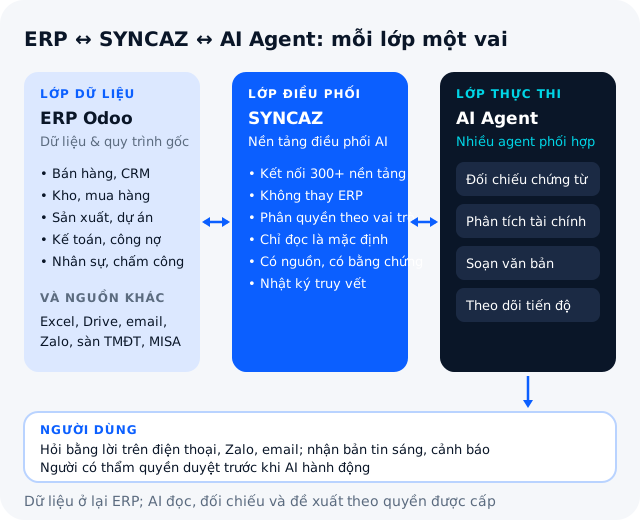
| Criteria | Odoo ERP | SYNCAZ + AI Agents |
|---|---|---|
| Role | Store the data and run the core processes: orders, inventory, manufacturing, accounting, HR | Read, cross-check, reason and propose actions on that data |
| Data sources | Data entered and generated in the ERP | The ERP plus Excel, Google Drive, email, Zalo, e-commerce marketplaces, accounting software — 300+ platforms |
| How it is used | Screens and reports per module | Ask in plain language on the phone, Zalo, Slack, Teams; morning briefings; threshold alerts |
| Output | Accurate figures, standard processes | Word, Excel, PPT reports; alerts with evidence; proposals awaiting approval |
| System changes | It is the core platform | No need to replace ERP/CRM/HRM or re-enter data |
SYNCAZ is the AI orchestration platform for businesses developed by ENTROSOFT: it connects existing data, processes and systems so that multiple AI Agents work together on tasks within the permissions granted. Each job has its own agent — one reads documents, one analyzes finances, one drafts documents, one tracks progress — and they coordinate like a department, then answer you in one concise reply. The AI Agent concept and how it differs from a chatbot are covered in What is an AI Agent; here we only look at how AI Agents for ERP work.
How is this different from pasting figures into ChatGPT?
A regular chatbot only knows what you paste into it and only answers when asked. A business AI assistant reads the ERP and connected sources on its own, understands operations the way your business actually runs them (bills of materials, manufacturing orders, budgets, marketplace fees…), sends briefings and alerts by itself, creates real files and proposes actions for an authorized person to approve.
Control: AI only works within the scope granted
- Role-based permissions: team leaders see only their own line, accountants see product costs; cost prices and salaries are visible only to authorized people.
- Read-only by default: in the first phase the assistant only reads data; write access is opened gradually, task by task.
- People approve before any action: placing purchases, changing plans, emailing customers — the assistant proposes, an authorized person confirms.
- Sources and audit log: every figure states which document it comes from; who asked what and what the assistant did are all logged.
- Data is not used to train public AI models: deploy on the cloud or on your own servers (on-prem), with models running internally for sensitive data.
For businesses already running Odoo ERP, Odoo is one of the sources SYNCAZ connects to, alongside CRM, HRM, accounting, email, chat, document storage, e-commerce marketplaces and call centers. That is how ENTROSOFT does Odoo AI: the AI sits on the business's real data rather than being a standalone tool.
AI in ERP across 3 industries
The use cases below come from the three published SYNCAZ AI Assistant brochures; figures, customer names and item codes in the brochures are illustrative.
1. Manufacturing
- Spot orders at risk of delay early: the assistant combines manufacturing orders, stock and purchasing schedules with supplier emails. Example from the brochure: an order for a Japanese customer is at risk of a 4-day delay because the lining fabric has not arrived; the assistant finds a second supplier with the same item in stock that can deliver within 2 days and proposes a top-up purchase to make the shipping date.
- Material issues above the bill of materials: every night all issue slips are cross-checked against manufacturing orders and BOMs, with no sampling; orders that issued more material than the BOM without a return slip are flagged with evidence.
- Orders profitable in the ERP but losing money in reality: the assistant points out orders with material issued above the BOM or overtime shifts not yet included in the product cost, with a reconciliation file attached.
The ERP foundation for a factory (BOM, manufacturing orders, product costing) is covered in ERP for manufacturing businesses.
2. Services & agencies
- Projects losing money without anyone knowing: payment requests not yet linked to a project, freelancer hours not yet booked as costs — the assistant finds projects that show a profit in the ERP but are actually losing money.
- Extra items requested but not billed: customers confirm additional items over email or Zalo but the quotation is not updated; the assistant collects them and reminds the team to issue an addendum.
- 13-week cash flow forecast: based on each customer's actual payment habits rather than just the contract terms, so it can warn of a cash-short week about 6 weeks ahead.
3. E-commerce
- Nightly marketplace reconciliation: matches orders with the marketplace payout file and bank statements; detects payouts that came in short because service fees were charged twice or returned orders were not refunded the shipping fee, then prepares a claim file for approval.
- Real profit per SKU and per marketplace: deducts marketplace fees, vouchers, ads, affiliate commissions, shipping, return costs and cost of goods to reveal best-selling SKUs that lose money.
- Unusual spikes in returns: groups orders by province, carrier and post office to pinpoint the cause when the return rate suddenly jumps.
The underlying operations (marketplace sync, warehouse, statement reconciliation) are covered in the multi-marketplace e-commerce operations management system; AI is the layer on top of that data.
AI assistants for business: ERP first or AI first?
There is no single answer; it depends on where your data lives today:
| Situation | Where to start |
|---|---|
| Odoo ERP already running smoothly | Connect SYNCAZ to the ERP and the surrounding sources; pilot with the Board of Directors and Accounting first |
| Separate software and Excel, no ERP yet | Connect SYNCAZ to the existing data right away without changing systems; in parallel, standardize processes and plan an ERP roadmap |
| About to implement ERP | Design the ERP with clean master data, item codes and permissions from day one so AI can use it after go-live |
Businesses torn between a ready-made package and a large ERP project can read fast-rollout package or full ERP and browse the E-Solutionspackages; both paths can be extended with SYNCAZ AI on the same data.
The 8-week roadmap from the SYNCAZ brochure
- Weeks 1–2 – Connect & understand the business: connect the ERP, accounting, Excel, email and Zalo groups; load master data, terminology, processes and permissions.
- Weeks 3–4 – Pilot with the Board & Accounting: morning briefings, cash flow forecasts, document cross-checks, anomaly alerts.
- Weeks 5–6 – Extend to operating departments: sales, purchasing, warehouse, production or customer service depending on the industry.
- Weeks 7–8 – Company-wide & measure results: HR, legal, administration; measure time saved and the number of anomalies found.
Checklist before bringing AI into your ERP
- One point of contact on the business side.
- View (read-only) access to the ERP, accounting software and the systems to connect.
- Clean master data: item codes/SKUs, customers, suppliers, current BOMs or price lists.
- The permissions you want: who may see cost prices, salaries, receivables and payables.
- A few sample files for the demo: one month of orders, stock movements, a receivables list or a marketplace payout file.
- Three to five questions leadership currently has to wait until month-end to answer.
- Baseline figures to compare after the pilot: hours spent on reports, hours spent on reconciliation, number of discrepancies found.
SYNCAZ by ENTROSOFT: start with a 60-minute demo
ENTROSOFT is an official Odoo implementation partner in Vietnam and the developer of SYNCAZ. One partner handles both layers — ERP and AI — so data, permissions and processes are designed to fit together from the start. Suggested first step: send a few sample files and watch a 60-minute demo on that very data; according to the brochure, SYNCAZ will find at least 3 things the business did not know.
Want to discuss it on your own business data? Request an AI-integrated ERP consultation — the ENTROSOFT team will get in touch to schedule a demo.
Frequently asked questions
Does AI-integrated ERP mean replacing the ERP you already use?
No. SYNCAZ connects to the ERP and existing systems (300+ platforms, including Odoo, accounting software, Excel, email, Zalo and e-commerce marketplaces) so AI Agents work on that data, with no need to replace your ERP/CRM/HRM or re-enter data.
Can SYNCAZ be used without Odoo ERP?
Yes. SYNCAZ can read any ERP, accounting software, Excel, Google Drive, email and Zalo. Still, the more standardized the data in the ERP, the more accurate the AI's answers, so many businesses choose to do both in parallel.
Is it safe for company data to bring AI into the ERP?
The assistant applies role-based permissions and is read-only by default; every action such as placing a purchase or sending an email needs approval from an authorized person and is recorded in an audit log. Data is not used to train public AI models; it can be deployed on the cloud or on your own servers.
How long does it take to roll out an AI assistant on ERP?
According to the roadmap in the SYNCAZ brochure: about 2 months for the whole business, in 4 two-week phases, with value from week 3 when piloting with the Board of Directors and Accounting.